The supplier invoice workflow is easiest to compare when you split it into six stations: intake, reading, assignment, approval, posting with archive, and exceptions as a side branch. The approval path and the hand-over to accounting are often already handled by a module of the ERP system (the software for accounts, sales and stock) the company already uses. Two parts often remain manual: the first stage, reading, sorting and matching documents that arrive by e-mail and as scans, and the exception queue. That is where, after rules and ordinary reading, AI makes sense. A separate document workflow system is worth considering when the current module does not handle the documents, approvals or archive you need. How we build that part for a finance team is described on the accounting automation page.
This text is for somebody who has a quote for an electronic document workflow system on their desk (a DMS, a document management system that usually also handles workflow) and wants to know what they are actually paying for. I write it as a practitioner who designs such flows. KSeF is the Polish Ministry of Finance’s National e-Invoicing System; a cost centre is the unit or place in the company a cost is charged to; an accounting entry assigns a document to ledger accounts. Facts about KSeF and vendors’ modules are given as of 12 October 2026, with sources at the end.
Six stations and who handles them
The same split fits an invoice, but also a contract or an acceptance report; for documents outside accounting, station 5 means completion and archive rather than an accounting entry and payment. Using an invoice as the example, the table shows what an ERP workflow module usually does at each station, what a separate workflow system does, and where AI adds something a rule cannot. Both product columns are a starting point for checking, not a promise: the scope depends on the product, the version, the licence and the configuration.
| Station | ERP workflow module | Workflow system (DMS) | Where AI helps |
|---|---|---|---|
| 1. Intake | Invoices from KSeF; e-mail and scans depending on version | One entry point for mail, scans and paper | Flagging a likely duplicate when a rule does not link the invoice from KSeF and from e-mail, e.g. a number written differently; a person merges the documents after checking |
| 2. Reading | KSeF invoices as data; scans through a text-reading service (OCR) — check availability and how it is charged | Reading standard invoices (OCR) | Documents without a fixed layout: contracts, acceptance reports, delivery notes, foreign invoices received outside KSeF |
| 3. Assignment | Rule by supplier; cost allocation (cost centre, project) manual or by configuration — check where the system takes it from | Rules routing to a department and person, by configuration | A cost-centre and project proposal when the rule is not enough; matching to a contract or order |
| 4. Approval | Path, notifications, history, reminders | Multi-level paths, deputies, approval on the phone | Does not approve. Can summarise the case for the approver |
| 5. Posting and archive | Accounting entry and payment after approval, depending on the module | Archive with an audit trail, hand-over to the ERP | An accounting-entry proposal for approval |
| 6. Exceptions | Depending on configuration: return to a stage, rejection — check passing the case up | Rejection, return and passing the case up as separate paths, by configuration | Gathering the context, drafting a question to the supplier or process owner |
One sentence per station, so it is clear what we mean. Intake is the moment a document becomes visible to the company in one place rather than in five mailboxes. Reading turns the document into data. Assignment answers: from whom, to which cost centre, to which project and who approves. Approval is a person’s decision, on time. Posting and archive are, for an invoice, the accounting entry, the payment and a recorded history available for inspection; for other documents, completion and archive. Exceptions are everything that does not fit the rules, and a list of such cases with a named person responsible.
The detail of posting is on the accounting automation page and is not repeated here.
Document workflow in a company: the diagram
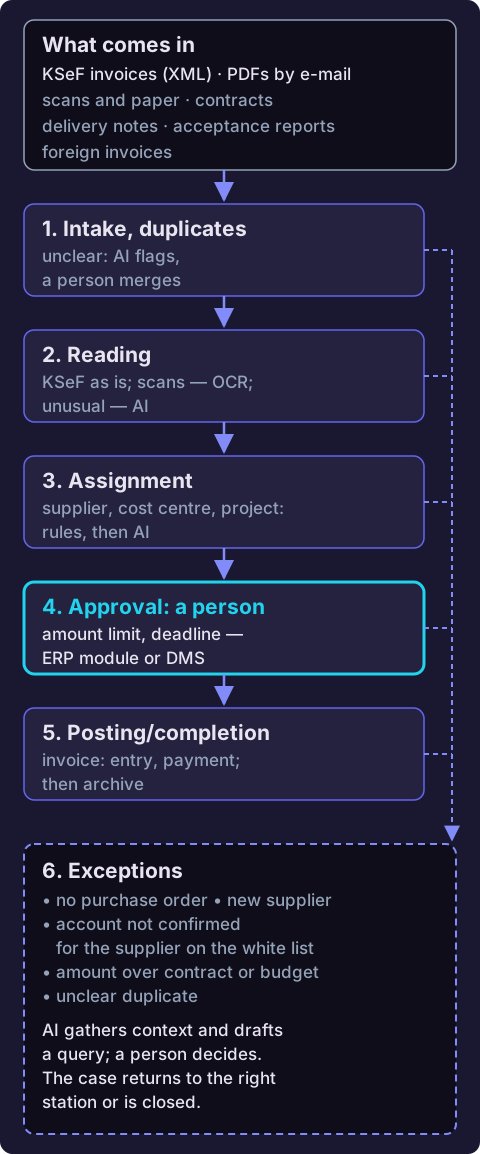
The same diagram as text:
- What comes in: KSeF invoices (an XML file, that is data in fields rather than a scan), PDFs by e-mail, scans and paper, and besides invoices, contracts, acceptance reports, delivery notes and foreign invoices.
- Station 1, intake: one place for every channel; a rule merges duplicates, and in unclear cases AI flags a likely duplicate, and a person merges the documents after checking; unresolved pairs go to exceptions.
- Station 2, reading: a KSeF invoice is readable as is; standard scanned invoices are read by a reading service (OCR), and unusual documents without a fixed layout by AI.
- Station 3, assignment: supplier, cost centre and project by rules, and by an AI proposal when a rule is not enough.
- Station 4, approval: a person decides, within the amount threshold and deadline set in the ERP module or the workflow system.
- Station 5, posting or completion and archive: for invoices, the accounting entry and payment in the ERP; for other documents, completion; then a record in the archive.
- Station 6, exceptions: no purchase order, a new supplier, an account not confirmed for the supplier’s tax number on the VAT white list, an amount over the contract or budget, an unclear duplicate. AI gathers the context and drafts a question, a person decides, and the case returns to the right station or is closed.
The diagram is deliberately not only for accounting. In a transport company the inputs are consignment notes and delivery notes, in construction the acceptance reports from subcontractors, in manufacturing the delivery documents against orders. The stations do not change; what counts as an exception does. Examples for these sectors are on the AI for transport and AI for construction pages.
Before you buy a workflow system, check what you already have
A common buying mistake: a company buys a second approval path because it does not know it already has the first one in its licence. Below is what the makers of three systems often found in Poland say about their modules in their documentation and own materials. It is not a ranking or a recommendation, just a list to check against your own version.
| System | Module | What the vendor describes |
|---|---|---|
| Comarch ERP Optima | Document Flow (Obieg Dokumentów, separate licence) | A document library; process schemes with stages and groups of authorised people; a deadline and reminder; a history of hand-overs; a scan read by the Comarch OCR service creates a document in the flow; e-mail attachments into the flow |
| enova365 | Workflow | Notifications about invoices awaiting approval; cost allocation details (cost centre, budget); automatic accounting entry after approval; history and reminders; OCR reading or electronic data interchange (EDI); connection to KSeF |
| Symfonia | eDokumenty (an extension of Symfonia programs) | KSeF invoices and documents outside KSeF (e-mail, scan) in one flow, through integration with Symfonia KSeF Plus; cost description (cost centre, project, VAT rates); an approval path with notifications; the approved cost passed to accounting |
Three questions worth asking your ERP vendor before you start talking about a separate system:
- Does my licence include a workflow or approval module, and if not, what does adding it cost?
- Does the module accept documents from e-mail and scans, or only from KSeF?
- After approval, is the accounting entry created automatically, or does somebody still have to type it in?
If the module handles the channels you need, the approvals, the hand-over to accounting and your archive requirements, a separate system may be unnecessary. Compare a DMS quote only against the missing functions, including for documents outside accounting: enova365, for example, describes employee-request workflows in its Workflow module.
Example: a supplier invoice, step by step
Below is the route of one supplier invoice, marking the station each step lands in. We leave out what we have described elsewhere: building the “mailbox → PDF → reading → approval” automation in a specific tool is in the n8n guide, and an example of assigning invoices to projects is in the text on AI automation examples. Here are the steps that are not there.
- One entry point and duplicates (station 1). The same invoice arrives through KSeF, and the supplier also e-mails a PDF to a salesperson, who forwards it to accounting. A rule compares the tax number (NIP), the invoice number and the amount; a KSeF invoice also carries the number the system assigned. When the PDF has the number written differently or arrives as a photo, AI only flags a likely duplicate: a person merges the documents after checking, and unresolved pairs go to the exception list. Wrongly merging two different invoices would hide one of them.
- The supplier from the register (station 3). For a new Polish supplier, the registration data is fetched by tax number from the REGON database of Statistics Poland (GUS). The service is free and requires an access key. When the supplier is not in REGON, for example because it is foreign, the case goes to the exception list, and a person enters and checks its details.
- VAT white list: check and flag (station 3, and station 6 if there is a mismatch). The system checks whether the account on the invoice is assigned to the supplier’s tax number in the Ministry of Finance’s register of VAT taxpayers, known as the white list, on the given day. The register has a free API, a connection through which a program can check this. The system decides nothing: when the register does not confirm the account belongs to the supplier’s tax number, the invoice goes to the exception list, and the decision is made by the person responsible for payments together with the accountant. When the check could not be made because the register did not respond, the case waits with a different flag from a negative result.
- Where the cost centre and project come from (station 3). First from the order or contract, if the supplier gave its number. Then from who placed the order, and from that supplier’s history. Only when that is not enough, for example with an invoice whose lines belong to three departments, does AI propose a split, which a person approves.
- Approval threshold and deadline (station 4). The company sets the amount up to which a department head’s approval is enough, and a deadline for the decision. After the deadline a reminder goes out, and then the case moves to a deputy. The ERP module or the workflow system does this, without AI.
- Accounting entry to the ERP (station 5). After approval, the accounting entry and the payment order are created. AI can prepare the entry proposal, but the person in accounting authorised to approve the entry approves it. On the day the transfer is ordered, the system checks the white list again for that day and records the result, because the station-3 check confirms only that day’s state. If the account cannot be confirmed, the payment goes to the exception list and stays on hold until a person decides.
- Confirmation of receipt and messages to the supplier (stations 1 and 6). The person in the company who forwarded the document gets an automatic confirmation: “accepted” or “purchase order number missing”. In the first version, the system only drafts messages to the supplier, and a person sends them after checking.
When a rule is enough and when AI is needed is covered under AI automation for business; in short: the rule first, AI where rules run out.
A sample supplier invoice procedure
A one-page template to fill in with your own values. You set the fields in square brackets, not the system.
- We accept invoices through KSeF and one e-mail address: [address]. A document that still arrives on paper is scanned by [person] on the day it arrives and added to the same place.
- Every document has one record in the system; a duplicate is merged with the original, not deleted.
- The cost allocation (cost centre, project) is completed by [person who ordered] within [number] working days.
- Approval: up to PLN [amount] the department head, above PLN [amount] [the board or the finance director]. Deadline for the decision: [number] working days; after that the case moves to a deputy.
- An account not confirmed for the supplier on the white list, a missing purchase order or a new supplier: the document goes to the exception list, owned by [person].
- After approval, accounting [posts the invoice or approves the entry proposal] and prepares the payment. On the day the transfer is ordered, the system checks the white list again and records the result; [person] holds a payment to an unconfirmed account until it is cleared up.
- Once a month, [person] reviews the four metrics from the next section.
Four metrics you can measure yourself
We give no target values, because without your starting point they would be invented. Measure them for a month before any change, then compare. Count documents after duplicates are merged; the duplicate metric’s numerator counts extra copies. Each metric below specifies which period to use.
- Time to approval. For documents received in the period, after a fixed observation window (for example 30 days after the period ends, as for duplicates below), report the median number of working days from arrival to approval for those already approved, together with the number and share still awaiting approval. Read the two figures together. The median, not the average, because one invoice lost for three weeks distorts the average.
- Share assigned automatically. Among documents that a person reviewed during the period: the number for which the system itself named the cost centre, the project and the approver, and the reviewer did not change any of those three assignments, divided by the number of all reviewed documents, times 100. Documents not yet reviewed are left out.
- Duplicates caught. The number of extra copies merged with the original before anyone added cost allocation details or paid the invoice, for every 100 unique documents received in the period. Count a copy in the period in which the original arrived, even if the copy came later, so the numerator and the denominator cover the same documents. Compare periods after the same observation window, for example 30 days after each period ends.
- Exceptions per 100 documents. The number of documents with at least one exception for every 100 unique documents received in the period, checked after the same observation window as for duplicates, for example 30 days after the period ends. Beside it, it is worth measuring how long exceptions wait for a decision. This metric shows where the work really is.
A long time to approval with few exceptions is a signal to check responsibilities, deadlines and deputies in approval. With many exceptions, group their causes and find the station where they arise. Only then choose between a change of procedure, system configuration or AI support.
What KSeF changes
Since 1 February 2026, VAT taxpayers have as a rule received structured invoices through KSeF. Issuing in KSeF has been mandatory since 1 February 2026 for companies whose sales including tax exceeded PLN 200 million in 2024, and since 1 April 2026 for the rest. Until the end of 2026, taxpayers with sales of up to PLN 10,000 gross a month may issue invoices outside KSeF; only invoices that as a rule must be issued in KSeF count towards the limit, not, for example, consumer invoices. Once the limit is crossed, the obligation covers the invoice that crossed it and every later one, including in months with lower sales. Also until the end of 2026, cash-register invoices, and receipts with the buyer’s tax number up to PLN 450 that count as simplified invoices, are allowed outside KSeF. The obligation to issue in KSeF does not cover, among others, taxpayers with neither a registered office nor a fixed establishment in Poland; they may, however, issue invoices in KSeF voluntarily. Position as of 12 October 2026, according to the Ministry of Finance’s pages.
For document workflow this means one thing: invoices received through KSeF arrive as data, and the effort moves to documents received outside KSeF, that is contracts, acceptance reports, delivery notes, debit and credit notes that are not invoices (noty), and foreign invoices that were not received through KSeF. What is left for AI after KSeF in accounting itself is set out in the text on KSeF and accounting automation.
Electronic document workflow in a company: when a separate system is the right buy
This text does not say “never buy a DMS”. An electronic document workflow in a separate system is worth comparing with the ERP module if you have the requirements below and the current module does not meet them:
- approvals are multi-level and across many departments, with deputies and different thresholds for different kinds of cost;
- the flow covers documents outside accounting: contracts, leave requests, HR documents, correspondence;
- you need an archive with an audit trail that must meet the requirements of an audit, an inspection or your sector’s regulations;
- your ERP has no workflow module, or the module does not accept documents from e-mail and scans;
- the company has several entities or branches, and documents move between them.
How much an electronic document workflow costs depends on items worth counting before you talk to a vendor: licences per user or per company, the number of processes, cloud or a server on your own premises, integration with the ERP, document-reading volume, archive migration, configuration, training and support. AI does not replace a workflow system. It can support reading, assignment and exception handling where rules are not enough; decisions and approval stay with a person.
One caveat applies to every variant: documents contain your suppliers’ data, including personal data for sole traders. Before anything goes to an AI system, decide what really needs to be sent. How we approach data in a project is described on the data security and GDPR page; the GDPR is the EU’s General Data Protection Regulation.
What next
Measure the four metrics for a month and check what your ERP licence covers. If approval is the bottleneck, start with the module you may already have. If the bottleneck is exceptions and documents arriving by e-mail, write to us with how many documents a month pass through each station. We will tell you which one we would start with, even when the answer is “that part is already in your system”.
Sources: as of 12 October 2026
- Scope of mandatory KSeF — Ministry of Finance page (in Polish): issuing deadlines, the receiving obligation from 1 February 2026, exclusions and voluntary issuing; read on 12 October 2026.
- Legal basis and key KSeF dates — Ministry of Finance page (in Polish), modified on 29 May 2026: the Act of 5 August 2025 (Journal of Laws 2025 item 1203), exceptions until the end of 2026; read on 12 October 2026.
- What to know before stage II of KSeF — Ministry of Finance explanations (in Polish): once the PLN 10,000 limit is crossed, the obligation to issue in KSeF covers the invoice that crossed it and every later one; read on 12 October 2026.
- Below PLN 10,000 — Ministry of Finance Q&A (in Polish): only invoices that must be issued in KSeF count towards the limit; consumer invoices and receipts up to PLN 450 do not; read on 12 October 2026.
- Comarch ERP Optima: document flow processes and CRM and Document Flow, 2026 version — vendor documentation (in Polish).
- enova365: document flow in a company — vendor material of 23 July 2024 (in Polish).
- Symfonia eDokumenty — vendor page (in Polish).
- VAT taxpayer register API — Ministry of Finance, National Revenue Administration (in Polish).
- REGON API (BIR1) — Statistics Poland (in Polish).